New Product - Lightning PDF Pro 8 for Mac
Save 25% Instantly
- The Fastest, Easiest Way to Create, Convert and Edit PDF Files
View this offer online.
If you prefer not to receive emails of this kind, you may unsubscribe here. |
 |
 |
Lightning PDF Professional for Mac |
|
|
|
|
|
|
| Easily Convert and Edit PDF Files |
|
 |
CREATE industry-standard PDF files from text files, images and web pages |
|
|
CONVERT PDF text, images, watermark and pages with full editing features |
|
|
EDIT PDF text, images, watermark and pages with full editing features |
|
|
Regular Price: $79.99 |
| Savings: $20 |
 |
| Your Price: $59.99 |
|
|
|
|
 |
|
|
| 90-Day Money Back Guarantee |
|
|
 |
|
 |
|
COMMENT using annotation and mark up tools |
|
|
LEADING-EDGE OCR digitizes text in image-based PDF files |
|
|
“QUICK-SIGN” PDF documents with handwritten signatures |
|
|
Fill out and customize PDF forms from templates |
|
|
| |
|
| |
Lightning PDF Pro 8 for Mac makes it easy to handle a variety of tasks when working with PDF files. You can update and edit PDF files, edit PDF text and images, split and merge PDFs, review and collaborate with others, plus fill out PDF forms. In a few clicks, you can also convert PDFs into Word or text formats for easy review and editing. Using built-in OCR technology, you can even edit and convert image-based PDF documents. Version 8 easily supports creating industry-standard PDF files from web pages, images, RTF and plain text files too.
|
|
| |
Create Industry Standard PDFs
Create 100% industry-standard PDF files from and text (.rtf, .rtfd, .txt), images (.png, .jpeg, .jpg, .bmp, .tiff, .bmp) and web pages (.html & .htm) files. The newly created PDF files can be viewed and edited with any professional PDF program, like Adobe Acrobat on any computer. Combine different types of files into a single PDF document.
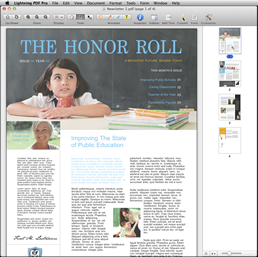
Edit Text, Images & Watermarks
Edit text and objects in a PDF file using a full toolbox of editing tools. Automatically match text font style, color and typeface. Insert, delete and crop images quickly.Add and remove text and image watermarks effortlessly.
|
|
|
| |
|
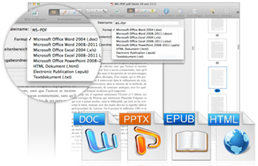
Split, Merge & Convert
Delete, extract, insert and crop PDF pages. Split a large PDF document into a small one. Merge multiple PDF files into a new single PDF file. Rotate PDF orientation between Landscape and Portrait. Convert PDFs to: Microsoft Word document, Excel spreadsheet, PowerPoint slide, plain Text file and HTML page. |
|
| |
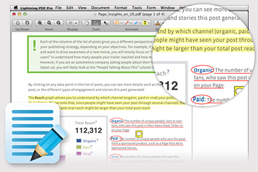
Mark Up, Annotate & Signatures
Annotation, markup and freehand drawing tools bring focus to text with highlighting, underlining, strike through, sticky notes, text boxes, rectangles, clouds, arrows and stamps. Pre-made dynamic, standard business style stamps are provided to declare PDF status. Import your handwritten signature and use it as a stamp to quick sign PDF files. Type with keyboard, draw with mouse, capture pictures or import images to create unique signature stamps.
|
|
|
| |
|
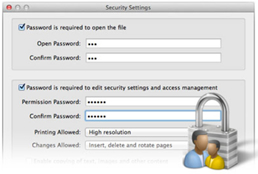
Password Protect
Protect PDF files from being opened, copied, edited or printed by unauthorized people.
OCR Technology
Recognize and digitize text in image-based, scanned PDF files making it possible to select, search and edit the text. |
|
| |
Enable OCR before converting image-based PDFs, which in return will make the output documents editable as well. Recognizes PDF files in English, German, French, Italian, Portuguese, Spanish, Japanese, Korean, Greek, Russian and Chinese.
Customize Forms
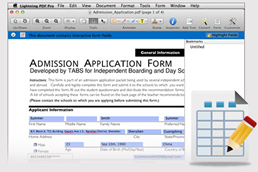
Create interactive fields with highlighting to make it easy to fill in forms. Customize PDF forms from templates and edit the form’s interactive fields.
|
|
|
| |
System Requirements
Mac OS X 10.6, 10.7, 10.8 or 10.9 (Mavericks), CPU: Intel 512MHz, Hard Disk: 100M and above.
|
|
|
|
|
|
Just $79.99 $59.99 - Save 25% Instantly |
|
| 90-Day Money Back Guarantee |
|
|
|
|
|
|
 |
|
Add e-Marketing@web.novadevelopment.com to your contact list to ensure that you receive our e-mails in your inbox.
This email is sent to #EmailAddr# because you have asked to receive news and promotional updates from us.
If you prefer not to receive emails of this kind, you may unsubscribe here.
Your privacy is important to us. Read our privacy policy.
©2016 Nova Development. All rights reserved. Nova Development, 23801 Calabasas Rd. Suite 2005, Calabasas, CA 91302. |
|
|
